10 Best Dark Web Monitoring Tools & Services (2026)

Quick Summary
The best dark web monitoring tools for most business security teams are Breachsense, SpyCloud and Flare.
| Tool | Best for | Rating |
|---|---|---|
| Breachsense | Teams that want plaintext passwords, alerts sent by webhook, with an API-first platform | 4.8/5 (G2) |
| SpyCloud | Identity teams automating password resets after infostealer infections, even in on-prem Active Directory | 4.7/5 (G2) |
| Flare | Teams that want each alert to arrive with a severity score | 4.7/5 (Gartner) |
Why one leaked login is still enough
Wherever multi-factor authentication (MFA) isn’t enforced, one stolen password is enough for an attacker to sign in as the employee it belongs to. Verizon’s 2026 Data Breach Investigations Report (DBIR) counted credential abuse, such as signing in with stolen passwords, at every stage of a breach. Credential abuse showed up in 39% of breaches (p.16). Exploited vulnerabilities were the most common way attackers first got in, at 31% of breaches (p.15).
A stolen password can provide initial access, or be the next step after an attacker gains access via another method. Either way, you need to know a password leaked before an attacker exploits it. How early you learn about a leaked password depends mostly on where your dark web monitoring tool gets its data from. We compared ten vendors on data sources, plus what each alert contains and how alerts are delivered.
Why listen to us?
Breachsense is a dark web monitoring API with over 42 billion leaked credentials indexed, each with the date we first found it. Our founder, Josh Amishav, spent nearly 20 years pen testing, often using leaked credentials to gain access to client networks before building a tool to find them. Our research has been cited by TechTarget and The Register, and class action lawyers cite our breach records in lawsuits.
What is dark web monitoring?
Dark web monitoring means checking criminal forums, markets, Telegram channels and leak sites for your company’s stolen credentials and data. When a record matches one of your domains or monitored search terms, your team gets an alert. We cover how records get matched to your search terms in what is dark web monitoring.
Vendors call these products tools or services more or less interchangeably. The real difference is whether the provider’s analysts review alerts before your team sees them, which some vendors sell as a managed option, such as CrowdStrike’s Recon+.
Why is dark web monitoring important?
- Many stealer logs reach Telegram within hours. Infostealer malware sends the passwords and session cookies saved in a browser to its operator, bundled as a stealer log. In our own collection, we often see stealer logs posted in Telegram channels within hours of the infection.
- Work passwords leak in other companies’ breaches. When an employee reuses a work password on another site and that site is breached, the password lands in the breach dump. Because the breach happens on a third-party system, your security stack won’t see it.
- Session cookies get past MFA. An attacker who steals a valid session cookie can access your authenticated session. A stolen session token bypasses both the password and MFA.
- Leaked credentials often show up before a ransomware attack is made public. Verizon’s 2026 DBIR (p.44) looked at ransomware victims with a credential leak in the prior year. Half of those victims had a leaked credential in the 95 days before being named on a ransomware leak site.
- Unmanaged devices leak work passwords too. EDR (endpoint detection and response) only runs on devices you manage. A personal laptop with a saved work password has no EDR agent on it. A stealer log may be the only sign the laptop was infected.
10 best dark web monitoring tools & services
- Breachsense
- SpyCloud
- Recorded Future
- Flare
- CrowdStrike Falcon Adversary Intelligence Recon
- Flashpoint
- ZeroFox
- DarkOwl
- Constella Intelligence
- ID Agent Dark Web ID
| Tool | Best for | Rating |
|---|---|---|
| Breachsense | Teams that want plaintext passwords, alerts sent by webhook, with an API-first platform | 4.8/5 (G2) |
| SpyCloud | Identity teams automating password resets after infostealer infections, even in on-prem Active Directory | 4.7/5 (G2) |
| Recorded Future | Enterprises that also want vulnerability and brand intelligence from one vendor | 4.5/5 (G2) |
| Flare | Teams that want each alert to arrive with a severity score | 4.7/5 (Gartner) |
| CrowdStrike Recon | Security operations center (SOC) teams already running CrowdStrike Falcon | Not enough reviews |
| Flashpoint | Teams that track physical and geopolitical threats alongside cyber ones | 4.5/5 (G2) |
| ZeroFox | Teams whose main problem is brand abuse and executive impersonation | 4.4/5 (G2) |
| DarkOwl | Analysts who search dark web content and archives themselves | Not enough reviews |
| Constella Intelligence | Fraud teams monitoring customer data, such as phone numbers and addresses | 4.6/5 (G2) |
| ID Agent Dark Web ID | Managed service providers (MSPs) that monitor many clients and require a dashboard to manage them | 4.1/5 (G2) |
1. Breachsense
Breachsense finds data that has already leaked from your company or your vendors. Credentials come from stealer logs, combo lists (lists of leaked email and password pairs), phishing kits and third-party breaches, along with session cookies and leaked API keys. Breachsense also indexes the files ransomware groups publish and personal data left in unsecured databases. Breachsense monitors hacker forums and darknet markets, including listings from initial access brokers, who sell ready-made access to company networks. Outside the dark web, Breachsense maps your external attack surface and flags lookalike domains that could be used to phish your employees and customers.
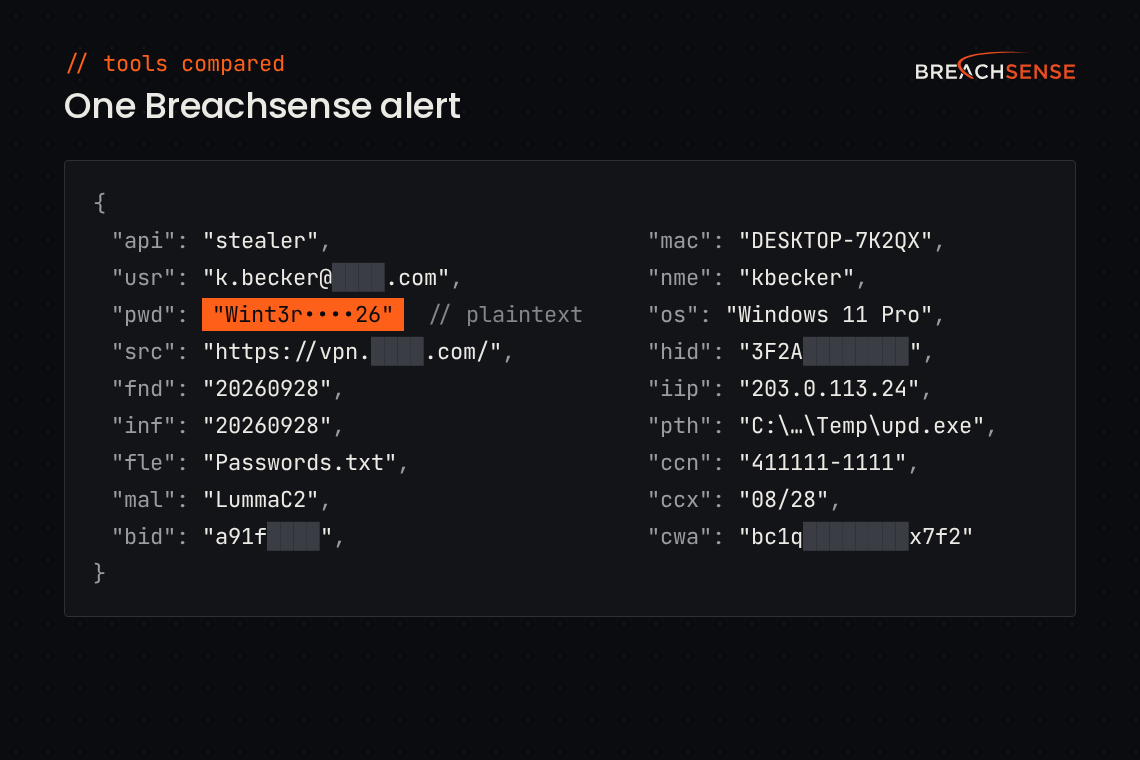
Each alert includes the email address or username and the password, in plaintext or as a password hash. Each alert also shows the first-seen date. Where the source records it, the alert names the site the password was used on. Stealer log alerts can also include the infected machine’s name and the malware’s file path.
Breachsense is an API-first platform. There is no dashboard to log in to. A webhook pushes each alert into your SIEM (security information and event management) or SOAR (the system that runs response steps automatically). Your tools can also pull the same records through the dark web monitoring API.
Key features
- Stealer log monitoring. Finds employee and customer credentials taken by infostealer malware, with the infected machine’s name and the malware family.
- Plaintext passwords. Cracks many password hashes in weak formats back to plaintext. A plaintext password lets you check whether that password is still in use. Passwords stored with strong hashing are practically impossible to crack.
- Leaked session tokens. Flags stolen session cookies that let an attacker bypass MFA.
- Leaked API keys. Finds API keys and OAuth tokens in stealer logs and leaked ransomware files.
- Phishing-harvested credentials. Catches passwords employees typed into phishing pages.
- Ransomware leak file search. Indexes the files ransomware groups publish when a victim won’t pay. You can search those files for your data when a vendor is breached.
- Domain takedowns. Finds lookalike domains registered to phish your staff, and takes them down.
Pricing: Not published. On a demo call, we learn your requirements, then put together a package that covers only what you need. Trials are available after the demo.
Rating: 4.8/5 on G2
Pros
- Pricing isn’t based on employee count, so an MSP can resell Breachsense to a 5-person client or a 500-person client without per-seat math.
- Nothing to install. You get a license key and example API queries. Most teams are up and running within an hour.
- Finds leaked API keys, and lets you search inside the leaked files themselves for your company’s data.
Cons
- No dashboard. Alerts arrive by webhook or email, so you need a tool or inbox to route them to.
- Doesn’t monitor social media for fake profiles impersonating your company or executives.
- No published prices.
2. SpyCloud
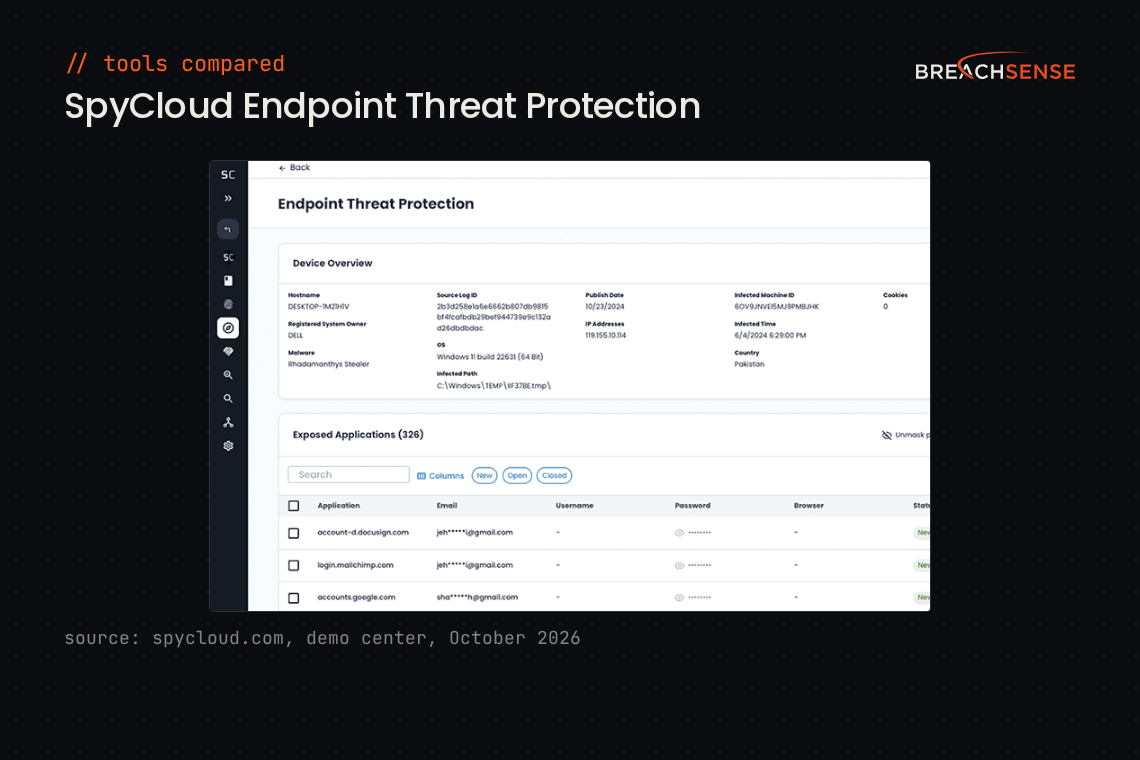
SpyCloud collects identity data from infostealer malware, phishing kits, combo lists and data breaches, and is built for cleaning up after an infection. SpyCloud finds every password and session an infected device exposed, so your team can force the resets.
SpyCloud says its data lake holds 65.7 billion distinct identity records, collected from more than 110 malware families and 140,000 breach sources. See our Breachsense vs SpyCloud comparison.
Key features
- Infostealer and phishing data. Collects saved passwords, cookies and app tokens from infected devices and phishing kits.
- Session invalidation. Ends sessions or forces reauthentication when a stolen cookie turns up.
- Automated remediation. Resets exposed passwords automatically in Active Directory, Okta or Entra ID.
- SIEM and SOAR integrations. Sends exposures to tools like Splunk and Microsoft Sentinel, with ready-made SOAR playbooks.
Pricing: Not published. SpyCloud tiers Enterprise Protection by the number of employee accounts protected.
Rating: 4.7/5 on G2
Pros
- Active Directory Guardian checks whether a leaked password matches the password that employee uses today.
- Reports new breach data quickly, sometimes before the breach is public.
- Exports and an executive report make it easy to show management what SpyCloud found.
Cons
- The price can be hard for smaller organizations to justify once they have MFA in place.
- Rolling out several SpyCloud modules at once is hard, so plan to add them in stages.
- API responses return different fields depending on the data, and processed alerts can’t be closed out.
3. Recorded Future
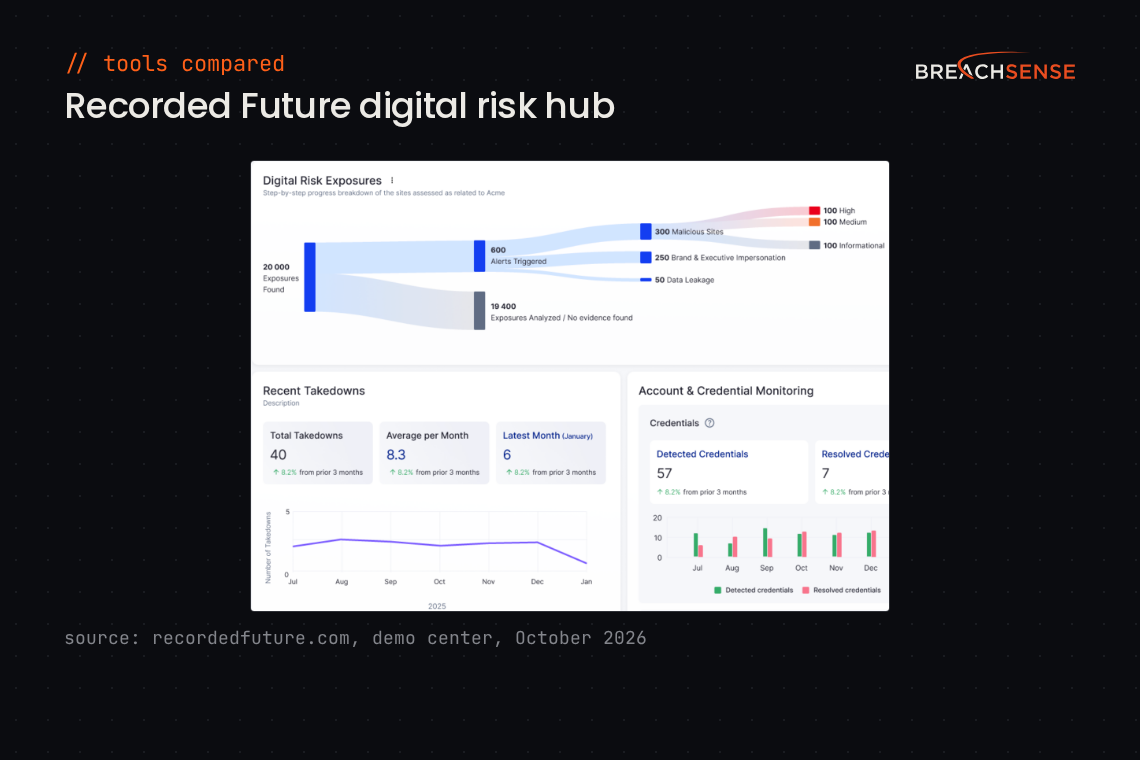
Recorded Future is a threat intelligence platform, owned by Mastercard since December 2024. Its credential monitoring sits in a module called Identity Intelligence. Recorded Future suits enterprises with a threat intelligence team that will use the rest of the platform too, such as vulnerability and brand intelligence.
Recorded Future says it collects from over a million sources, including the dark web. See our guide to Recorded Future alternatives.
Key features
- Identity Intelligence. Finds exposed credentials in infostealer logs and combo lists, plus database dumps.
- Compromised host reports. Shows the credentials stolen from an infected device, with an AI summary.
- Automated response. Triggers password resets and MFA challenges through your SOAR or IAM (identity and access management) platform.
- Brand monitoring. Monitors underground forums and ransomware sites for mentions of your brand, with takedown services.
Pricing: Not published. Recorded Future quotes by package (Core, Professional or Elite) and by organization size, which it measures in unique workforce credentials.
Rating: 4.5/5 on G2
Pros
- Gives fast context on an IP address or a CVE (a publicly listed vulnerability), with a risk score and the evidence behind it.
- Recorded Future’s malware sandbox returns packet captures.
- AI-generated reports help with quick investigations of new threats.
Cons
- Expensive, and modules like Identity Intelligence often need separate add-on licenses.
- The platform takes time to learn because there’s so much data, especially if you don’t use it every day.
- The query language is complex, and reports are hard to customize.
4. Flare
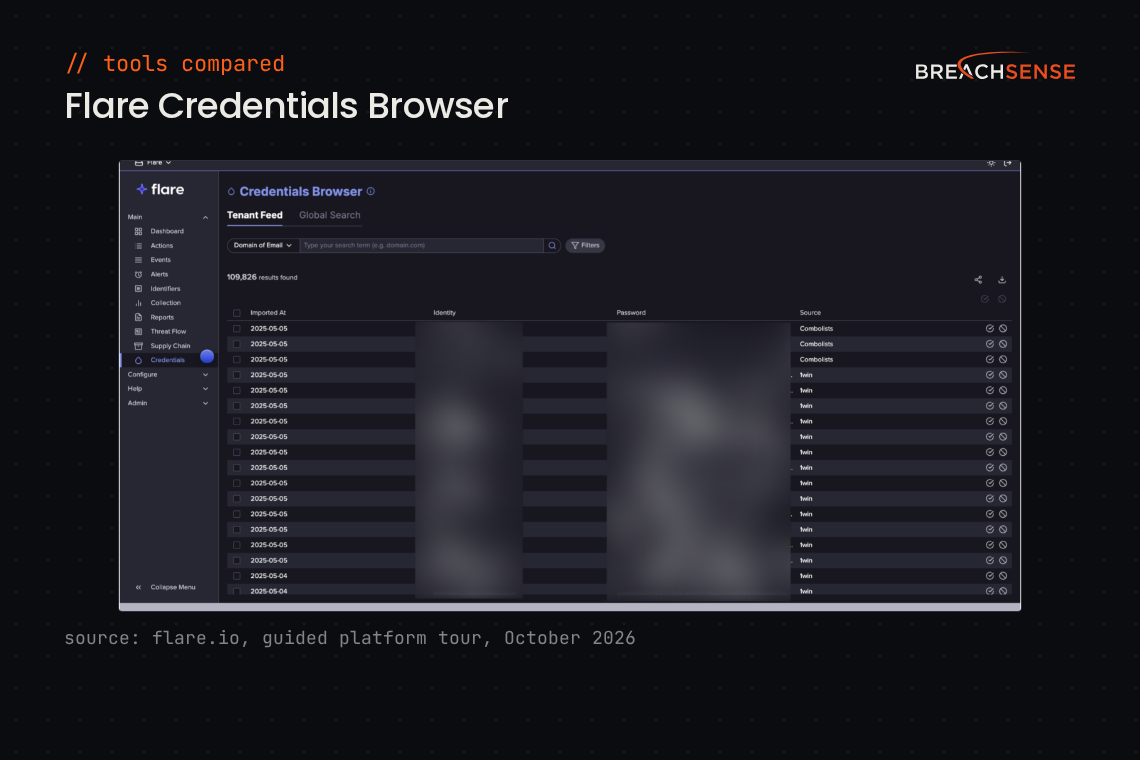
Flare scores and dedupes each leak it finds, so a security team can work through alerts without an analyst reading every post. Its sources include forums, markets, Telegram channels, stealer logs and paste sites (sites where anyone can post text anonymously).
Flare’s homepage claims coverage of 159 million stealer logs and more than 127,000 Telegram channels. Flare also monitors the Telegram groups that phishing kits send stolen passwords to. See our Breachsense vs Flare comparison.
Key features
- Automated triage. Scores each leaked credential or exposed session by severity before it reaches you.
- Session cookie revocation. Flags exposed session cookies and revokes them. Customer sessions can be revoked in bulk over the API.
- Identity Exposure Management. Checks whether leaked passwords still work in Microsoft Entra ID or Okta, then revokes sessions or disables the account.
- Lookalike domain takedowns. Lets you submit and track takedown requests inside the platform.
Pricing: Not published. Flare offers a free 14-day trial with no payment details, after a short video call to verify your identity.
Rating: 4.7/5 on Gartner Peer Insights
Pros
- Analysts without deep technical knowledge can set up Flare and investigate its alerts.
- New leaks appear in Flare quickly, in some cases within hours of the breach.
- Flare’s support team answers questions quickly and acts on feature requests.
Cons
- You can’t customize alerts or response actions much.
- Integrations with other security and SaaS tools are limited.
- Monitoring more domains or product names costs extra, and so do new features.
5. CrowdStrike Falcon Adversary Intelligence Recon
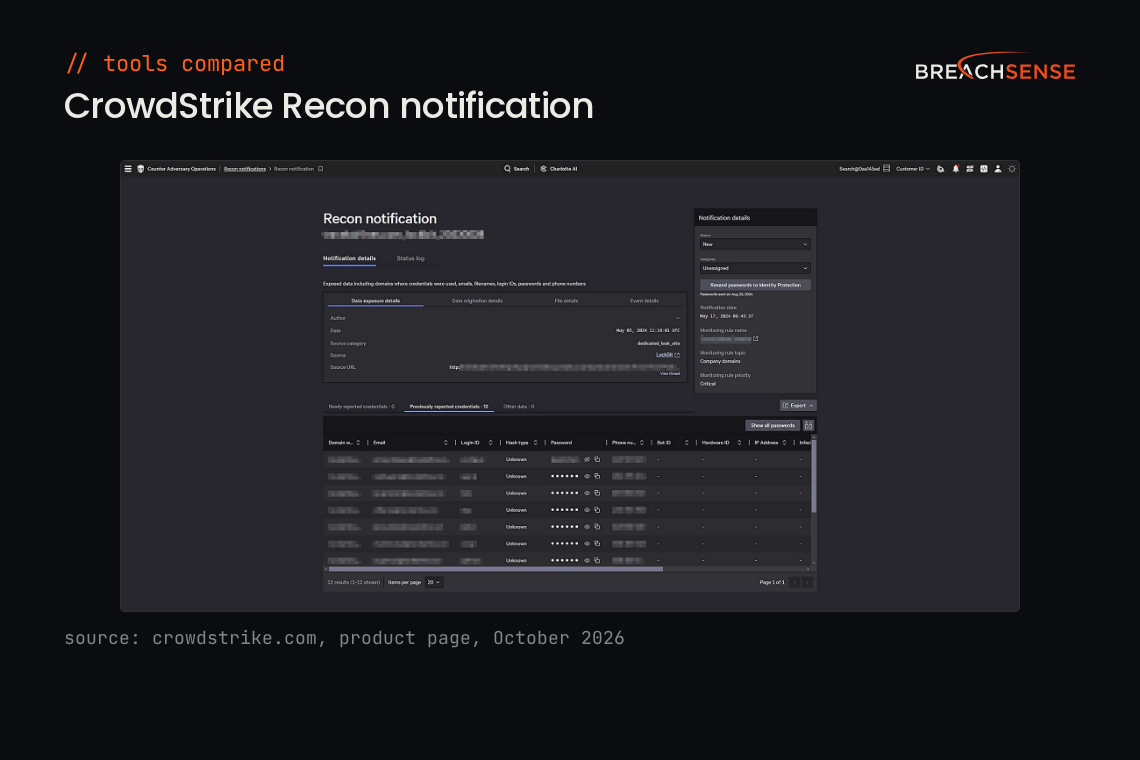
If your SOC already runs CrowdStrike Falcon, look at Recon. Recon is the dark web and digital risk monitoring feature in CrowdStrike’s Falcon Adversary Intelligence modules. You can search Recon results alongside data from your other Falcon modules.
CrowdStrike says Recon monitors millions of restricted webpages, plus encrypted messaging platforms.
Key features
- Underground source monitoring. Monitors forums, marketplaces and paste sites, plus messaging apps like Telegram.
- Credential response. Disables accounts or forces MFA challenges when exposed credentials turn up, using CrowdStrike’s separate Next-Gen Identity Security module.
- Takedowns. Asks registrars and hosting providers to remove phishing sites and fake profiles.
- Recon+ managed service. Has CrowdStrike’s own experts run the monitoring and takedowns for you.
Pricing: CrowdStrike doesn’t publish a price for Falcon Adversary Intelligence. The 15-day Falcon free trial covers only the Falcon Go endpoint products. CrowdStrike says you can request trials of other products through the CrowdStrike Store. The trial page doesn’t say whether the CrowdStrike Store offers a Recon trial.
Rating: Not enough reviews. CrowdStrike Falcon Intelligence Recon has three reviews on G2.
6. Flashpoint
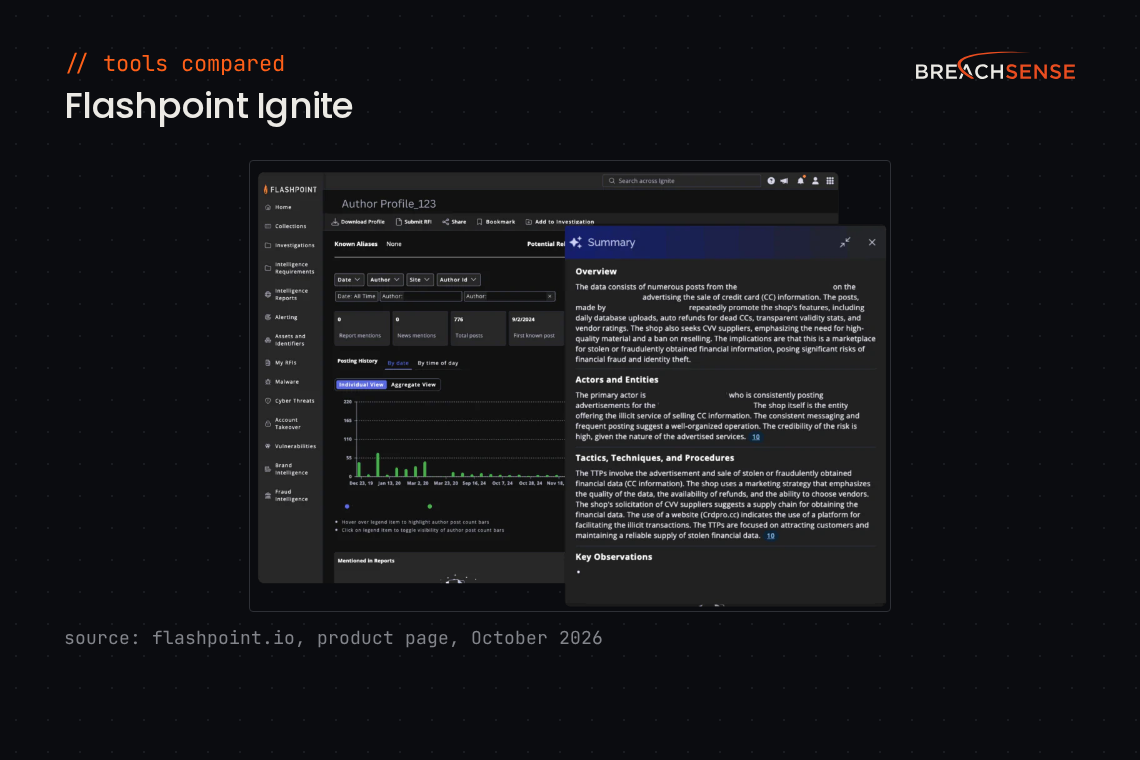
Flashpoint is a threat intelligence company that combines its Ignite platform with analysts who collect from closed communities, such as private Telegram channels. Banks and government agencies use Flashpoint to track physical and geopolitical threats alongside cyber ones.
Flashpoint’s account takeover page says its identity database holds over 48 billion stolen and leaked credentials, including credentials from infostealer logs. See our Breachsense vs Flashpoint comparison.
Key features
- Primary-source collection. Collects directly from ransomware sites and closed Telegram channels.
- Account takeover intelligence. Monitors compromised credentials, cookies and infostealer logs.
- Brand and domain takedowns. Spots typosquatting (domains registered with a misspelling of your domain) and requests takedowns of lookalike domains.
- Analyst services. Adds Flashpoint analysts who send curated alerts and run investigations for you.
Pricing: Quote only. Flashpoint’s pricing page lists packages but no prices. Flashpoint offers self-guided product tours but no free trial.
Rating: 4.5/5 on G2
Pros
- Shows the raw criminal posts and listings, with a link to the original post so you can investigate it yourself.
- Analysts turn around requests for information (RFIs) quickly. Flashpoint’s finished reports are thorough.
- The Ignite search is easy to filter by channel and author.
Cons
- Keyword alerts can be noisy and take work with Flashpoint’s team to tune.
- RFIs draw down a block of analyst hours. The hours each RFI takes vary, so RFI costs are hard to predict across a year.
- Frequent platform changes have broken integrations for some customers.
7. ZeroFox
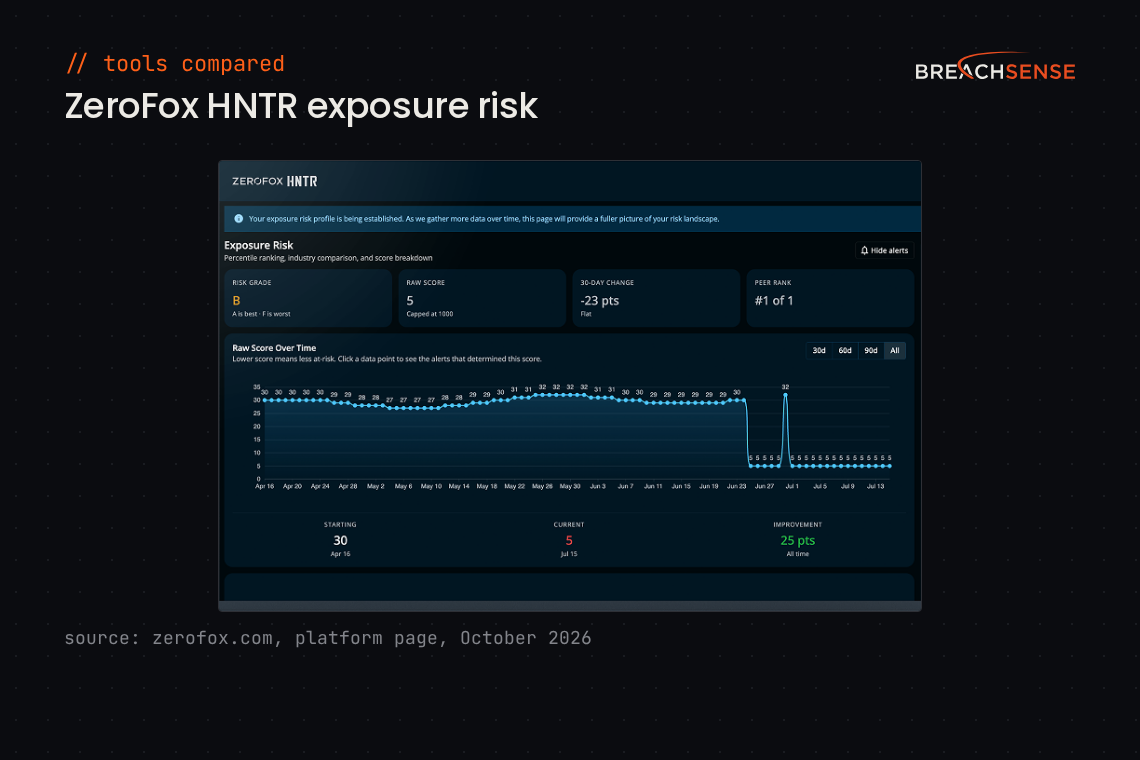
ZeroFox calls itself an external cybersecurity platform. Haveli Investments took ZeroFox private in 2024. ZeroFox is built around brand abuse and executive impersonation, with dark web and credential monitoring alongside.
ZeroFox says it collects more than 65 million dark web posts a month and indexes over 5,000 new stealer logs a day. See our Breachsense vs ZeroFox comparison.
Key features
- Dark web and Telegram monitoring. Covers criminal forums, markets, Telegram channels and ransomware leak sites.
- Compromised credential monitoring. Detects employee credentials in fresh stealer logs and dark web markets.
- Takedowns. ZeroFox’s own team takes down phishing sites and fake social media profiles. While a takedown is pending, more than 80 ZeroFox partners block access to the site or profile.
- Analyst services. Gives you intelligence analysts who write assessments and answer specific questions.
Pricing: ZeroFox’s pricing page lists four bundles, from Foundation to Executive, with no prices shown.
Rating: 4.4/5 on G2
Pros
- Flags lookalike domains and fake social media profiles that target your brand.
- Takes down scam storefronts and malicious ads without your team drafting legal paperwork.
- Bulk takedowns let you act on many alerts at once.
Cons
- Plans without analyst review rely on automated flagging, which can miss more convincing impersonation attempts.
- Brand monitoring can flag authorized resellers’ listings as brand abuse, which adds triage work.
- Sending ZeroFox alerts to a SIEM or SOAR can mean mapping the API fields by hand.
8. DarkOwl
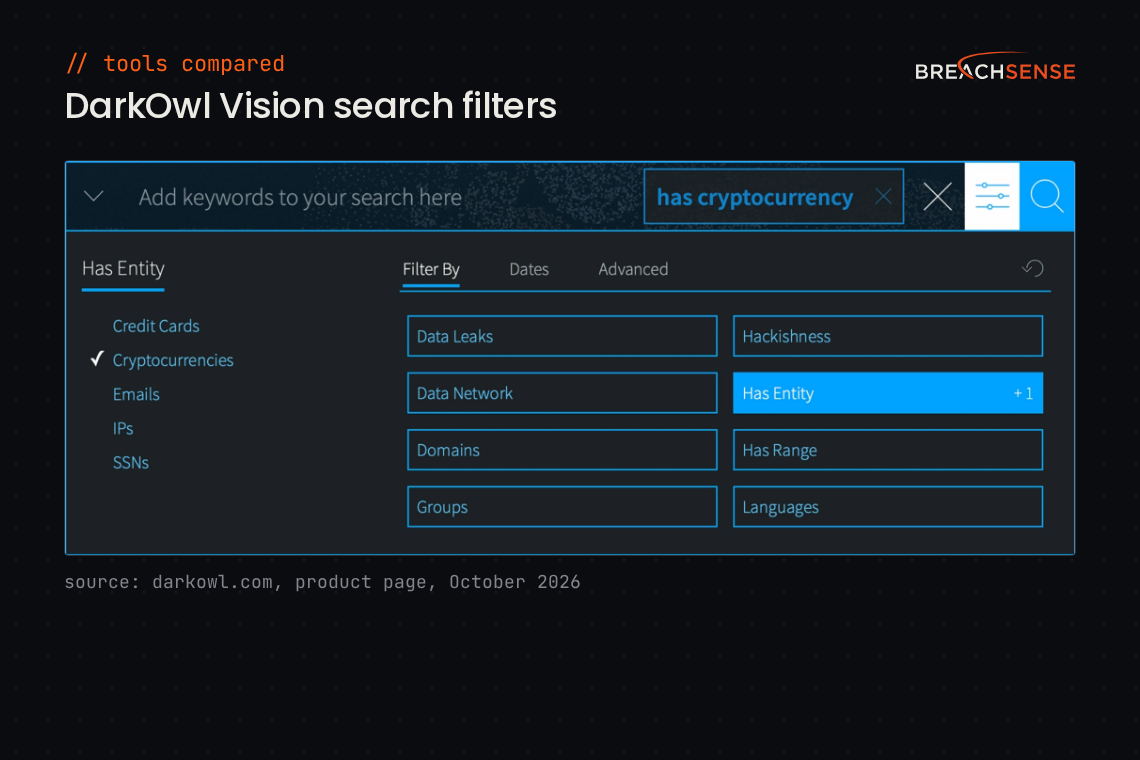
DarkOwl sells darknet data to analysts, either through its search interface and APIs or as bulk feeds. DarkOwl suits threat intelligence and investigation teams that want to search dark web content themselves, more than teams that only want credential alerts.
DarkOwl says 60% of its data comes from sources that need a logged-in account to reach. DarkOwl’s searchable archive goes back more than eight years. See our Breachsense vs DarkOwl comparison.
Key features
- Vision UI. Lets analysts search all darknet sources, or narrow to one network like Tor or a messaging platform like Telegram.
- Always-on monitors. Alerts you when terms you choose appear on darknet sources.
- Score API. Returns DARKINT Scores, a number DarkOwl calculates for how exposed an organization is on darknet sources.
- APIs and data feeds. Offers search and ransomware APIs plus bulk feeds, with integrations for Splunk and Cortex XSOAR.
Pricing: DarkOwl’s AWS Marketplace listing prices one Vision license at $38,000 for 12 months. For API pricing, contact DarkOwl’s sales team. The listing offers a free trial on request. DarkOwl’s site offers a demo.
Rating: Not enough reviews. DarkOwl Vision has one review on G2.
9. Constella Intelligence
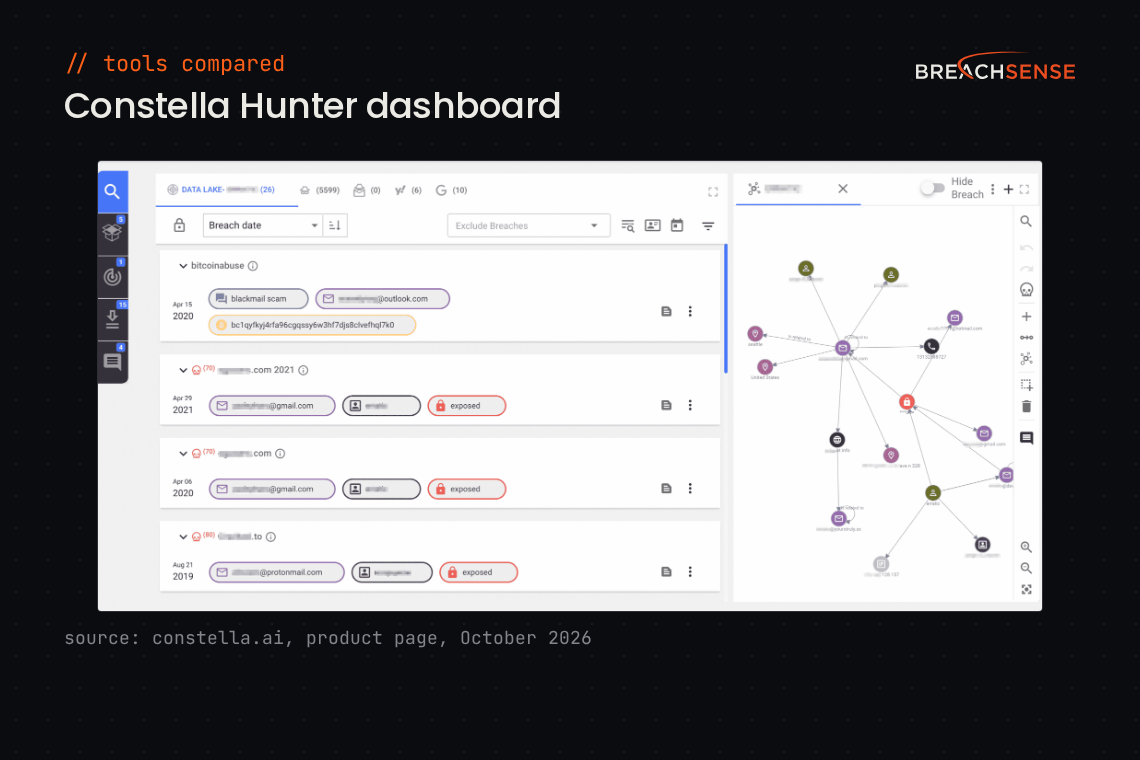
Constella Intelligence sells identity risk data through an API and a monitoring product called Hunter+ DRP. Constella monitors identity data for customers and employees, such as phone numbers and addresses. A dedicated financial services offering covers synthetic identity fraud and account takeover.
Constella says it processed 51.7 million infostealer packages in 2025. See our Breachsense vs Constella comparison.
Key features
- Identity Intelligence API. Returns emails and passwords plus other personal data, with more than 10 years of breach history.
- Stealer logs and session cookies. Gives you the raw stealer log files and stolen session cookies.
- Dark web alerts. Hunter+ DRP alerts you when credentials or sensitive documents appear on the dark web.
- SOAR and IAM integration. Locks down exposed accounts through your SOAR or IAM tools.
Pricing: Constella quotes after a demo, and offers a free exposure assessment.
Rating: 4.6/5 on G2
Pros
- The API documentation makes Constella easy to connect to your existing security tools.
- Pulls identity data from many sources, so analysts do less manual research.
- Also flags unauthorized use of your company’s brand.
Cons
- Pricing is hard for smaller organizations to justify, and costs rise with the volume of data you need.
- New users can find the number of features overwhelming.
- The API can slow down at peak times, which delays alerts.
10. ID Agent Dark Web ID
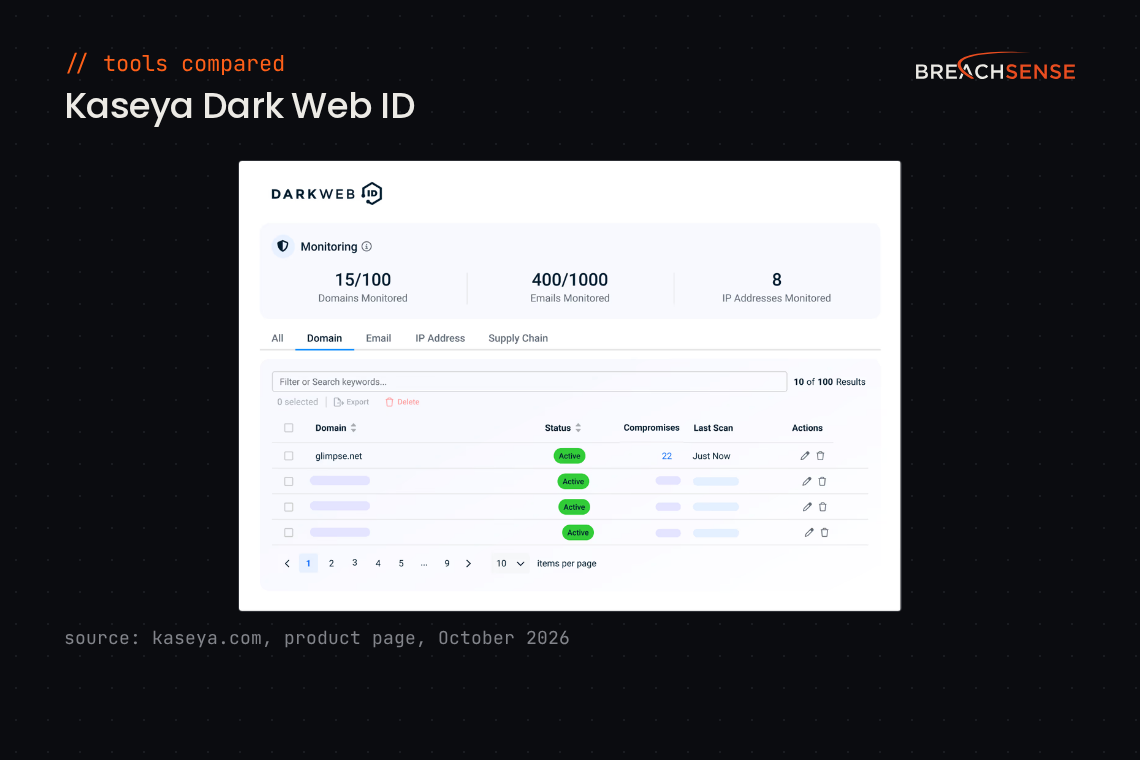
Kaseya built Dark Web ID mainly for managed service providers (MSPs) that monitor many clients at once. Dark Web ID is included in the Kaseya 365 User subscription, or sold on its own.
Kaseya’s help pages say Dark Web ID draws on more than 500 Internet Relay Chat (IRC) channels and 600,000 private websites. For MSPs, Dark Web ID includes monthly and quarterly Digital Risk Review reports to show clients what monitoring found. Our guide to dark web monitoring tools for MSPs covers more options. See our guide to Kaseya Dark Web ID alternatives.
Key features
- Hidden-source breach data. Pulls compromised credentials from hidden forums and marketplaces.
- Live Data Search. Shows clients and prospects their recent exposure, with passwords masked.
- PSA ticketing. Opens alerts as tickets in your PSA (professional services automation) tool, such as Autotask or ConnectWise PSA (formerly ConnectWise Manage).
- Executive monitoring. Adds executives’ personal email addresses as a paid add-on.
Pricing: Kaseya doesn’t publish a price for Dark Web ID. You can buy Dark Web ID on its own for a quoted price, or as part of the Kaseya 365 User bundle, which requires at least 50 licenses.
Rating: 4.1/5 on G2
Pros
- Easy to set up, and easy to enroll new client companies.
- MSPs use Dark Web ID both to prospect and to monitor existing clients.
- Monitors for stolen credentials at a cost MSPs consider reasonable.
Cons
- Some alerts arrive days or weeks after Kaseya first finds the data, too late to act on.
- Alerts often don’t say where the compromised data came from.
- Custom alerts and reports are hard to set up in the interface.
Selection criteria
How we evaluated
We compared each tool on five points, using each vendor’s own site where it publishes the detail:
- Stealer log and session cookie coverage. Whether the tool finds credentials and session cookies taken by infostealer malware.
- Coverage beyond credentials. Whether the tool also finds data like leaked files from ransomware attacks or credentials stolen by phishing kits.
- Leak-to-alert speed. How quickly a new leak reaches your team after it’s posted. No vendor publishes its alert speed, so measure alert speed during a trial.
- How you get alerts. Webhook, email, API or a dashboard, and whether each alert includes a plaintext password or only a password hash.
- Trial before buying. Whether you can test the tool on your own domain before you sign a contract.
Ratings come from G2, except Flare’s, which comes from Gartner Peer Insights. Pros and cons for every tool except Breachsense come from G2 and Gartner Peer Insights reviews, checked in October 2026. CrowdStrike Recon and DarkOwl have too few reviews for pros and cons.
How to choose
| If your team is… | Shortlist |
|---|---|
| A security team that wants leaked data sent straight into its own tools through an API | Breachsense |
| An intelligence team that also tracks vulnerabilities or physical threats | Recorded Future or Flashpoint |
| A team that wants each alert scored by severity | Flare |
| Automating password resets after infostealer infections, even in on-prem Active Directory | SpyCloud |
| Fighting identity fraud against customers | Constella Intelligence |
| Dealing mostly with brand abuse and impersonation | ZeroFox |
| Already running CrowdStrike Falcon | CrowdStrike Recon |
| An MSP monitoring many clients | Dark Web ID |
| Running dark web investigations | DarkOwl |
Once you have a shortlist, check two features in each demo. First, ask for first-seen dates on a live search of your domain, which shows how fresh the data coverage is. Second, check whether alerts include a plaintext password or only a password hash. For more credential-focused options, see our credential monitoring alternatives.
Matching the tool to your team
If two tools are still close and both offer a trial, run both against the same domain and see the quality and quantity of data returned.
To see what’s already exposed, run a free dark web scan on your domain. Then book a demo to see your own leaked records on the call.